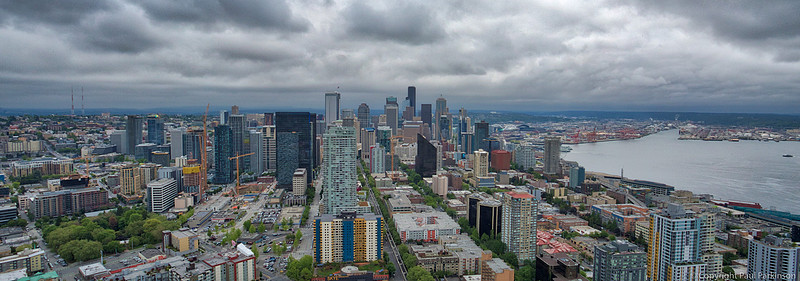
Seattle in the sunshine?
During the visit I had the opportunity to visit Seattle's famous landmark, the Space Needle, and try to capture some shots of the Seattle skyline and Elliott Bay from the viewing platform. The Canon EOS 5D Mark III is capable of performing in-camera high dynamic range (HDR) processing of bracketed images. This is a convenient feature, but the downside is that the output HDR image is saved in JPEG format, which means that there's less scope for post-processing if you're not entirely happy with the results. I've been a long time user of Apple's excellent Aperture photo-processing and management application on my Mac, and I was very disappointed at Apple's decision to discontinue Aperture in favour of the Photos application. After some experimentation, I decided I would not be migrating to Apple Photos, and I decided to use Adobe Lightroom as my default photography application instead. Lightroom is even more capable than Aperture in many respects (but not all - e.g. face recognition), but the workflow isn't quite as user-friendly as Aperture. I have also recently upgraded from Adobe Lightroom 5.6 to 6.0, and one of the new features included in the updated version is HDR processing, which I've experimented with a bit. However, I decided it was worth trying out a dedicated HDR processing application, and after reading positive reviews of AuroraHDR 2018, I've taken the plunge and purchased it. Although I haven't had the opportunity to spend a lot time with it yet, my experiences have been positive so far. It installs cleanly and integrates well with Lightroom 6.0, which means that I can export photo RAW files from Lightroom to AuroraHDR, perform HDR processing and then send the results back to Lightroom, enabling them to be managed by the Lightroom catalogue. This is a very nice workflow. HDR photography can polarise opinion, with some people being fans of the saturated images, and others take an instant dislike to them. My own personal preference is for "realistic HDR" images, which enhance the detail and colour of a scene, but without looking over-processed and unrealistic. I've added some photos to the Seattle gallery (and also Hawaii gallery) which illustrate some of the HDR processing modes available, and will add some photos from my whale watching trip in the Puget Sound, which was very memorable! 
Comments
No comments posted.
Loading...
|